This website is looked after by our Web Manager*. Click on the blue envelope to ask questions or make comments.

Aspects of this SiteWorks website that may be non-standard ...
... that any u3a could do with standard SiteWorks
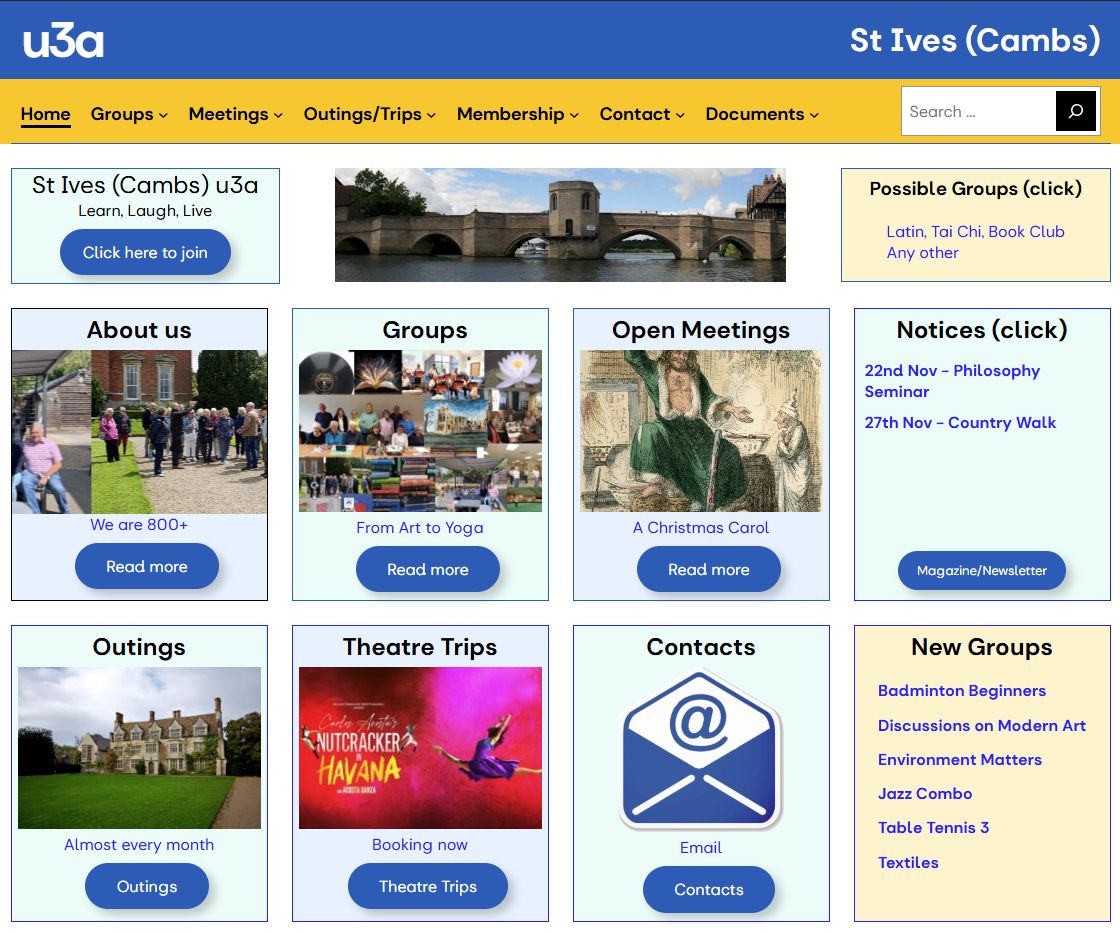
- Our Home page has a compact structure with few words - the overall design was initially inspired by the u3a site Home page
- The Home page is automatically dynamic, in that it has:
- a small Gutenslider ("About us" - cycles through images of interest groups)
- query loops set to return single events (the next Outing, and the furthest away Theatre Trip)
- a query loop based on a group category ("New Groups") [this would be better as a group "tag"]
- panels for Notices, new groups and possible groups - all fed in from elsewhere
- We are trying to organise by “Interest Areas” (which SiteWorks calls categories, and Beacon calls faculties) - see also the utility Groups by Interest Areas
- We try to make group data standard (eg they all should have a cost comment such as "Free"), and succinct (eg omit frequency if implied by the “When - additional text” field
- We call "Events" that have just a date and title "Topics" (eg Art Club and Art Appreciation - Your Way)
- On the page "For Group Leaders" we include national links including to Oversights (which can find all groups of a particular name in all u3as)
- Group posts are tagged by group (rather than by category as taught in SiteWorks training), so
- Post categories are used for other purposes (mostly Non-group)
- Blog - for a general blog eg for "Updates from the Chair"
- Community - for local organisations we are "consonant with", and list on our "Community" page
- Image Source - listed on the page "Using Images on the Website"
- Practice - for all practice posts, eg for individual Authors when training
- Text - for simple posts (usually containing just text) that are edited by group leaders (see the Insert Page plugin below)
- Venues have data to help group leaders explore possibilities
- As a u3a we want to operate as Teams, rather than as individuals, (in the website this is reflected by some teams being shown as interest groups)
- eg Website Editors, Website Authors, and Website Reviewers groups
- Some of our Group Leaders are set up as WordPress "Authors", and have received some basic training
- The expectation and style of training has been simplified several times
- Members of our "Website Editors" team (who are set up as WordPress "Editors", and have had more extensive training) each support a number of our groups
- they either do all the editing that their Group Leaders want, or support them in editing it themselves
- they also support their groups in other aspects of the systems they use (eg Beacon)
- the Web Manager's role is thus mainly to support the Website Editors, provide standards, training etc
- We have tried to make the website usable on a phone/tablet (where possible)
- to test this we use the Chrome extension "Mobile simulator - responsive testing tool"
- We have a page showing all the recommended website colours with their hex codes - useful when we need to enter these eg in documentation
... that use standard SiteWorks code, but requires system knowledge
- The standard layout for all groups includes a featured image, and every group has one
- and some featured images have been generated by AI (eg Scrabble on the Move)
- Quick Groups list on a page in the menu, as well as a list below each group
- Utilities (some accessible only by an admin user) for the admin to use, eg to list Group costs and venues
- The Bridge image on the Home page links to the Login page (if not already logged in)
- Technical documentation, that is available publicly
- Many 'ivo' † block patterns (listed in our Technical documentation) - major and minor
- Major "Synced" patterns include eg
- "ivo Group data" (a three-column pattern used at the top of all u3a group pages which incorporates the u3a single group data widget)
- "ivo Previous events" (a simple list of past events within a details block toggle used eg on Philosophy)
- Major "Unsynced" patterns include eg
- "ivo Group posts" (all of a group's posts - the tag in its query loop needs to be set)
- "ivo 3 column lists" (used eg for the year’s dates, by Term in colours, on Swedish Improvers)
- Major "Synced" patterns include eg
- We suggest 6 Methods of showing future meetings (ie events)
- 1) State it generally eg: Tuesday 12 Book Club: “We meet on the first and third Thursdays at 10 am”
- 2) Manually update before each meeting, eg Country Walks “Our next walk is on 26th April and we are ...”
- 3) Table of static dates eg ivo 2/3 column lists eg: see Swedish Improvers
- 4) Programme †† (entries are not visible after their date) eg Digital Photography
- 5) Use “Events” (standard SiteWorks) eg Outings
- 6) Use simple events (we call “Topics”) eg Philosophy
- The "list_nth_weekdays_of_the_month" public tool for listing eg the 1st and 3rd Wednesdays of each month (some Group Leaders want to do this on their pages)
- Global style changes: Buttons Block (natural drop shadow), and Links (no underline, except on hover)
- Template changes
- The u3a symbol in the standard page header links to the Home page (described as common practice by "Don't Make Me Think") - [the Header Template part]
- The navigation row is given an anchor (to be sticky) and a background colour - [the Header Template part]
- Single Posts template has the Previous/Next navigation shortcode at the foot
- Specific Single item templates for each custom post type, adapted as desired
- u3a contact template has the word “Contact” before the Title, as otherwise Contact pages can be mistaken for Group pages
- u3a group template has a blue header “All Groups” and “ivo All groups” pattern (or Quick groups block) at the bottom (as SiteBuilder did), a shortcode providing Action buttons for forms to Submit Posts etc based on the value of ivo_actions, a hidden shortcode - setting a session transient used by USP Pro forms
- u3a venue has the venue’s Featured Image
- u3a event created as the untailored Single Posts template
... that need other WordPress plugins
- Use of the FileBird Pro plugin for organising media into folders and sub-folders
- and use of the FileBird Gallery Block to display them
- (an alternative would be to rely on attaching images to posts, and using code, or USP, to display attached images)
- the FileBird Document Library Block is also used a little
- and use of the FileBird Gallery Block to display them
- Sticky Menu via the "Sticky Menu (or Anything!) on Scroll" plugin
- FlipBooks for pdfs eg individually and in galleries of thumbnails [3D FlipBook plugin]
- note that we add hidden paragraph after each with the titles so WordPress search finds them
- Most blocks (eg Group blocks) can have links [Clickable Blocks plugin]
- The u3a symbol in the standard page header links to the Home page (described as common practice by "Don't Make Me Think")
- An icon is attached to all external links [WP External Links plugin]
- Use of Yoast Duplicate Post plugin to enable us to copy any post or page (including u3a group etc)
- ("Copy to a new draft" is used a lot, but we expected to use the "Rewrite & Republish" more than we have)
- Easier editing by highlighting the blocks [Wayfinder plugin]
- Hide individual blocks based on rules [Block Visibility plugin], eg:
- screen size: technology to use on Latest Publication page
- date: switch between Renewals and Possible groups on Home page
- date: programme items on Digital Photography disappear when the date is past
- status: Bridge on Home page links to different pages for logged in users, and those not logged in
- always: enables comment blocks to show when editing but not displayed to users
- Simple replacement of images [Enable Media Replace Plugin]
- Ability to share what a draft post looks like [Public Post Preview Plugin]
- Use of Access Control shortcodes (from plugin USP Pro) to limit some blocks to eg admins only
- Separating the changeable part of group pages (usually containing just text) into "Leader posts" so they can be edited by group leaders without any danger of affecting the rest of the group page
- they are included in group webpages by using the Insert Page plugin and block
- Use of the Footnotes Made Easy plugin where necessary
- Use of plugins for better site administration Plugin Toggle, Simple History, Fabrica Synced Pattern Instances, Admin Notices Manager, WP Last Modified Info
- Occasional use of special plugins for particular admin tasks: Admin Slug Column, Bulk Change Media Author, Bulk remove posts from category, Filester - File Manager Pro, Media Library Assistant, Post Type Switcher, WP Ultimate CSV Importer/ Exporter, WPvivid
... that needed special programming knowledge
- We use the Code Snippets plugin for code
- to supply several commonly used functions for use by other processes
- to override default settings for some plugins, to make them as we want
- to prevent Authors from deleting any posts (Editors can do it for them if necessary)
- to enable u3a groups to store their revision history (as posts do)
- to add "Click here" after u3a event titles in query loops (as some of our users do not know to click)
- to prepend general search results by the type of post (eg Group, Contact, Event, Post etc) for clarity
- Use of Forms [Plugin USP Pro – (User Submitted Posts)] to enable users to submit posts - forms (accessed via buttons, feeding into query loops) so far implemented and used include:
- Submit Event, Topic, Extended Topic, Book Review, Group Post (includes photos), Notice, Regular Notice
- Blue envelopes everywhere to indicate email - eg as buttons using two techniques (asterisk and Contact)
- The standard layout for all groups includes a blue envelope, that automatically copies the "Group email" link
- This "Group email" text is changed everywhere to "Group admin", as some people thought it would send a message to the (whole) group
- Use of custom fields - all our custom fields start with ivo †
- to rename "Events" for specific groups, eg to Walks
- to switch on Action forms for groups (Submit Events/Posts etc)
- to specify how a form dropdown works
- to specify the FileBird folder for the group (so media can be put in the correct folder)
- All group posts have Previous/Next and Back to group buttons at the foot (in the template)
- Use of the WPvivid Backup Plugin, and custom php code stored off-line, to create a sanitised version of the production site on Local, for testing and development
- Various Additional CSS to tidy layout eg to reduce padding between submenu items and allow style choices - our classes all start with ivo †
- These are particularly useful for emphasis eg in excerpts
- Some specialised ivo † shortcodes to enable forms and other things
- Utilities to list groups, events, posts in various ways [using List Category Posts plugin shortcodes]
- There is a page "All my posts - of all types" that lists in a compact format all the Events, Posts, Groups, Pages and Notices for the current user
- This is the page Authors are directed to when they login, so do not need to see the Dashboard
- It is also where they are taken if they "click on the bridge" when they are already logged in
- Admin can use a utility to see this page as any chosen user would
Technically interesting group pages
- French Fiction has a table of dates and buttons to a sub-page and an external resource
- Country Walks has posts, each of which has a FileBird Gallery, and (maybe) our next event (called Walk because of a custom field)
- Art Club and Art Appreciation - Your Way have future events (ie Topics) and posts, each of which has a FileBird Gallery
- Philosophy has future events (ie Topics), and a sub-page with a subset of events (using an event category)
- Outings has future events (ie Outings) and a synced pattern (for social account payments)
- Science and Technology has future events (ie Topics), previous events pattern (includes detail), our next event pattern
- Digital Photography uses the Block Visibility plugin to produce a "Programme" where entries are not visible after their date
Other Technically interesting pages
- Latest Publication has an open FlipBook
- Magazines has thumbnails to a category of FlipBooks
- Interest Areas has details with query loops
- Home has a gutenslider, query loops set to return single events, a query loop based on a group category
- Insurance for Group Leaders has a FlipBook gallery shortcode block returning a single pdf (changed each year), and a FileBird Document Library (FDL) block for a Word document
Things we would have liked to do
- Coloured the groups according to status (eg Active) - as SiteBuilder did
- List groups by status, particularly those with spaces (this is fairly easy, so we will do)
- Have a "Closed" status for groups - in SiteWorks we have to un-publish or delete them when they close
- Use tags on groups to classify them (eg by which Website Editor looks after them)
- Enable Authors to edit group events even if they are not the owner of the group
- Let group leaders link to their group in Beacon, so it feels more like one system
- Introduce more functionality that the Chair would like (event booking, card payments)
Final Comment
My priority has been to get our u3a living and growing in whatever ways I can. Being a Web Manager, and introducing aspects of the website to make it more attractive and easy to use/update, is one way I am trying to do that.
Some of these enhancements work well for us and our members, others have not been so useful.
I am aware that all this extra complexity and coding requires me (or someone like me) to be on top of it. I am also aware that I shall not be able to do this for many more years. Therefore I am working on an "under the bus" plan, so that it can at least be gracefully downgraded over time into a standard SiteWorks site, as well as documenting and training.
My ideal scenario would be that many of our important enhancements would be brought into SiteWorks (or SiteWorks2) and therefore maintained. Some would be fairly easy to implement. And if the ideas here were useful in prompting others to find better ways to do them within a standard system, we would be happy to adopt them.
I recognise that there are lots of parts of our website that need improving (some groups have not been updated recently, some pages are unfinished, some ideas have not been fully enough imlemented yet, we have information to update our venues that needs adding), so it is likely to be always a work in progress. This ties in with the "vibe" our chair wishes to create. There is also much more to be done to get members using the website, and group leaders and officers to maintain it.
Footnotes"We only do what we can do"